

Prepare the route before departure
A Phone-Light Commute That Still Gets You There
Set up directions, payment, audio and one important contact while the route is still predictable.
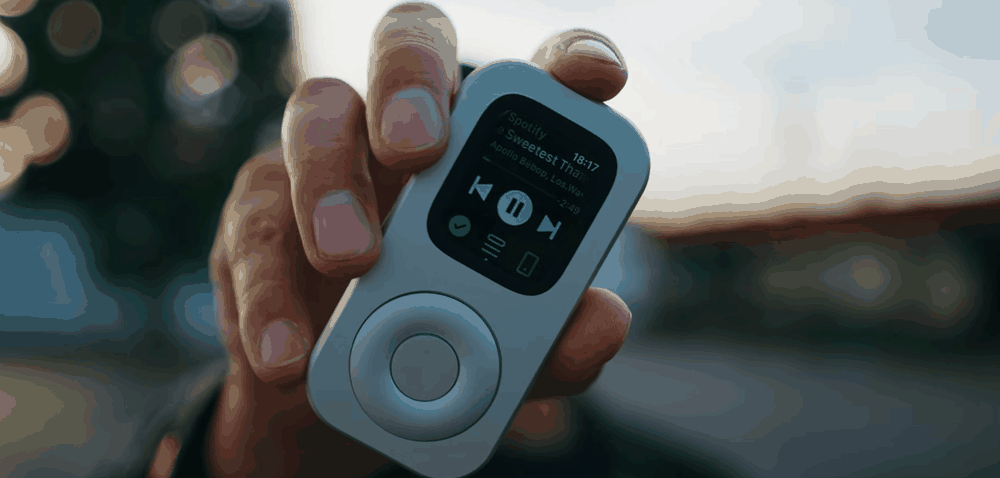
A familiar commute already has a sequence. Prepare that sequence in advance, keep the phone stored and let each repeated trip reveal one setup detail.
Use the route you already know
A commute is easier to plan than an open-ended day. You know the station entrance, usual transfer, coffee stop and expected arrival. You also know where the route can fail: a delayed train, an unreadable fare gate, a changed platform or an important message from home.
Write the trip in five lines: directions, fare or payment, audio, contact and fallback. Keep the first phone-light commute on your normal route and during a familiar time of day. This creates a useful baseline without asking one small device to solve every travel problem.
RePod houses a compatible Apple Watch and gives it a handheld, pocket-player form. Apple Watch supplies the software, services and connection. Confirm the exact Watch generation, case size and RePod variant before relying on the setup.
Prepare the night before
Most commute problems are easier to solve near Wi-Fi, a charger and the paired iPhone. Spend five minutes preparing before bed or while your Watch charges.
Review tomorrow's route and decide whether you need live Maps or a synced offline map. Offline maps require a supported Watch and watchOS setup, a region downloaded on iPhone and synced to Apple Watch, plus regional availability. Live directions depend on the network and service available to your exact setup.
Open the card or transit pass you expect to use. Apple Pay on Watch requires an eligible card and issuer, completed setup, a supported region and a participating merchant or transit system. Carry a physical card or other accepted backup.
Download one album, playlist, podcast or audiobook to the Watch and pair supported headphones. App, account, subscription, storage, software and regional conditions apply. Streaming has separate connection and plan requirements.
Choose the person or message path that must remain available. Calls, iMessage, SMS/MMS and third-party notifications depend on different combinations of Watch model, cellular or Wi-Fi, paired-iPhone state, carrier, app and region.
Save a written address, physical fare or payment option and the phone plan for disruptions. Keep the phone powered in your bag when an essential task has not been verified.

Know what remains connected
“Away from iPhone” describes several different states. A cellular Apple Watch with an active plan may have a direct connection. A GPS-only model may use a known Wi-Fi network. Some functions can work from content saved on the Watch. Some message paths still depend on the paired iPhone remaining powered on and online, even when it is far away.
Apple documents downloaded music, podcasts and audiobooks among the tasks a Watch can handle without its paired iPhone nearby. Apple Pay can also work away from the paired iPhone after the eligible card is set up. Those two capabilities have their own app, account, card, issuer, merchant, region and device conditions.
Messages deserve a separate check. iMessage, SMS/MMS and third-party notifications are not interchangeable. Apple notes that SMS/MMS and some third-party notifications may require the paired iPhone to be powered on and connected to Wi-Fi or cellular service. Test the exact path you expect to use.
Keep the phone stored on early tests
A powered phone zipped in a bag gives you a fallback while preserving the main routine: directions, fare, audio and quick checks stay on the Watch. Move the phone farther away only after the required functions have worked under the same conditions more than once.
Interact only when you are stopped
Choose the audio and open the route before moving. Store RePod while walking through traffic, boarding, cycling or driving. If you need to change directions or answer a message, stop in a safe place away from the path of travel.
Sound also needs a boundary. Keep volume and headphone use appropriate to the place, transit rules and your ability to hear what is around you. The phone-light routine should make the commute simpler without reducing awareness of the environment.


Night-before preflight
Your phone-light commute checklist
- Charge the Watch and confirm its exact RePod fit.
- Review tomorrow's route and sync any needed offline map.
- Open the intended Apple Pay card or transit pass and carry a backup.
- Download one audio item and test supported headphones.
- Test the required call or message path with the planned connection state.
- Keep the paired iPhone powered and online when the chosen function requires it.
- Store RePod while moving through traffic; make changes only while safely stopped.
- Choose a disruption plan before departure.
Adjust one thing after each trip
At the destination, note the first moment the plan felt incomplete. Maybe the offline map lacked part of the area, the fare gate did not accept the selected card, or the message path required the phone to remain online. Fix that one issue before the next trip.
Also note what stayed untouched. An unused payment backup still has value, while three unused apps may be ready to leave the routine. Repeating the same route gives you a clearer signal than changing the destination, connection and carry all at once.
A dependable phone-light commute grows from a small set of verified steps. Prepare the trip while the full setup is nearby, carry only what the route needs and let the phone stay stored until a real exception appears.
Sources and further reading
Prepare the repeat route